Request a consultation
Coming soon

Park without barriers.
Pay without an app.

Cameras capture the plates, your customers pay by QR code in the browser — and the portal works out for you what happens when spaces are lost. Barrier-free parking management with planning data, for sites in Switzerland, Germany and Austria.

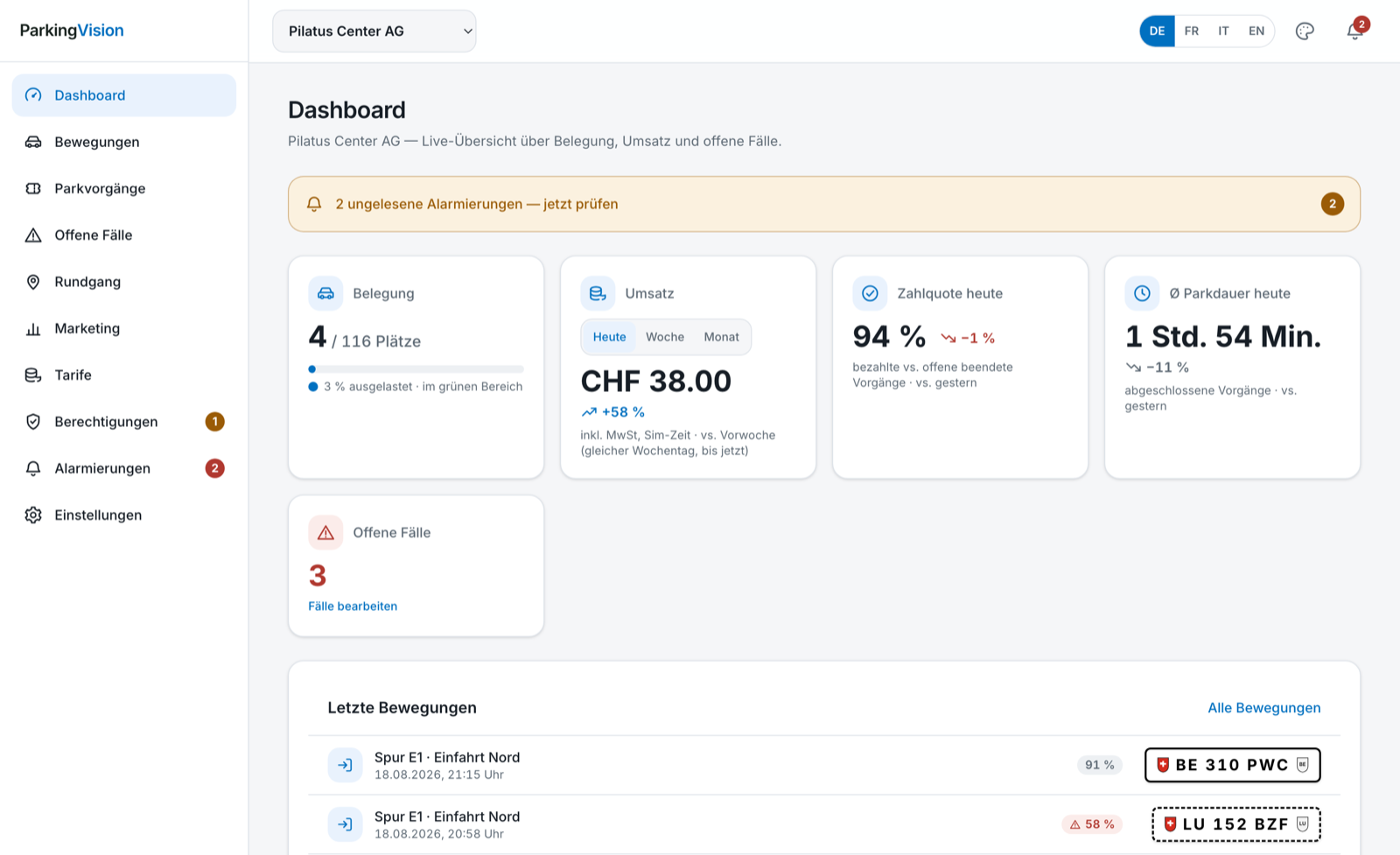
Operator portal on a laptop: dashboard with occupancy, revenue and payment rate
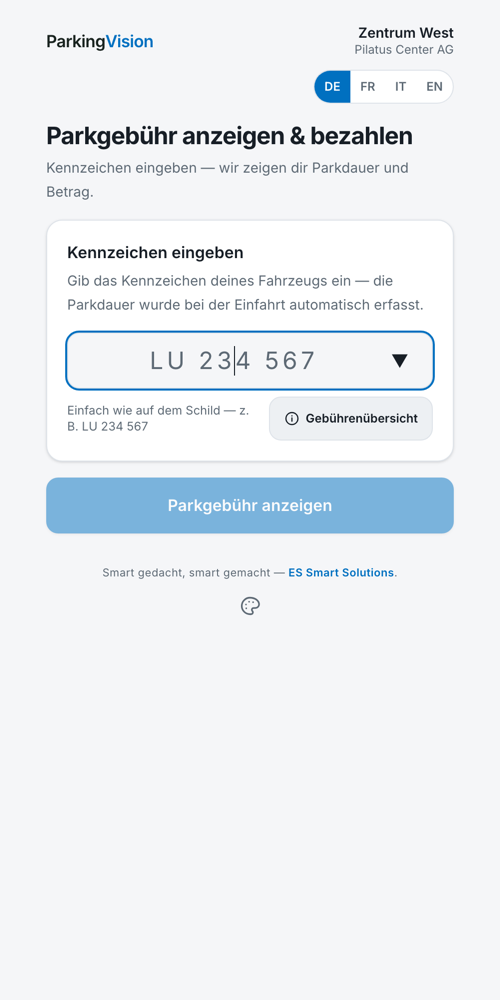
Payment page on a smartphone
No barrier, no maintenance
No app required, no registration
Hosted in Switzerland, no vehicle-keeper lookup
Plates from CH, DE, AT
Process

For your customers it simply feels like driving through

Three steps: no ticket, no stopping, no app to install.

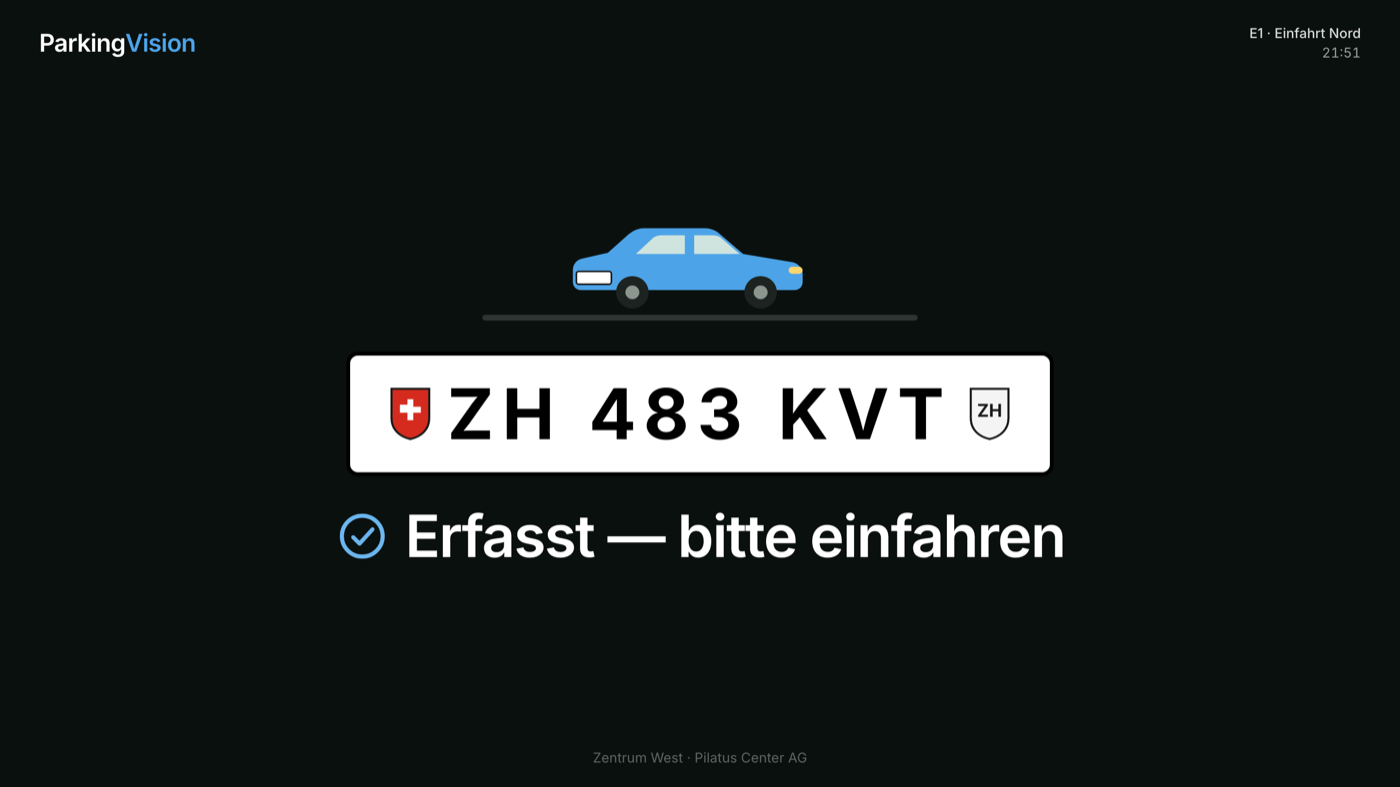
Display at the entrance: plate recognised, Captured — please drive in
1

Drive in

The camera captures the plate as the vehicle passes — the parking session starts automatically.

Payment page on a smartphone: enter the plate and pay the parking fee
2

Pay by QR code

Scan the QR code, enter the plate, pay — in the browser, with no app and no registration.

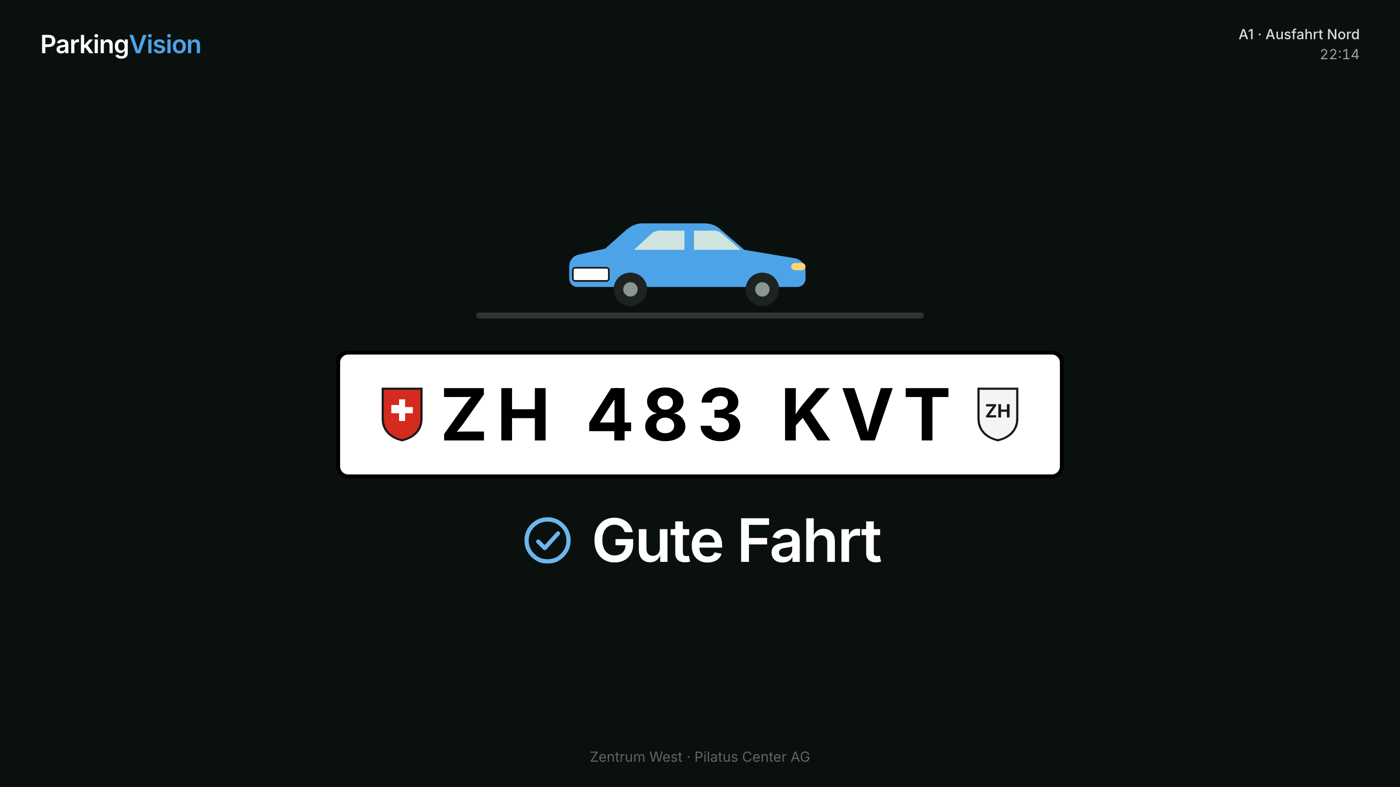
Display at the exit: Safe journey
3

Drive out

The exit camera closes the session. Paid? Safe journey — with no waiting.

Forgotten to pay? A grace period remains — you set its length yourself in the portal, and the display at the exit points it out.

Benefits

What this gives you as an operator

Revenue

Every parking session is documented and enforceable

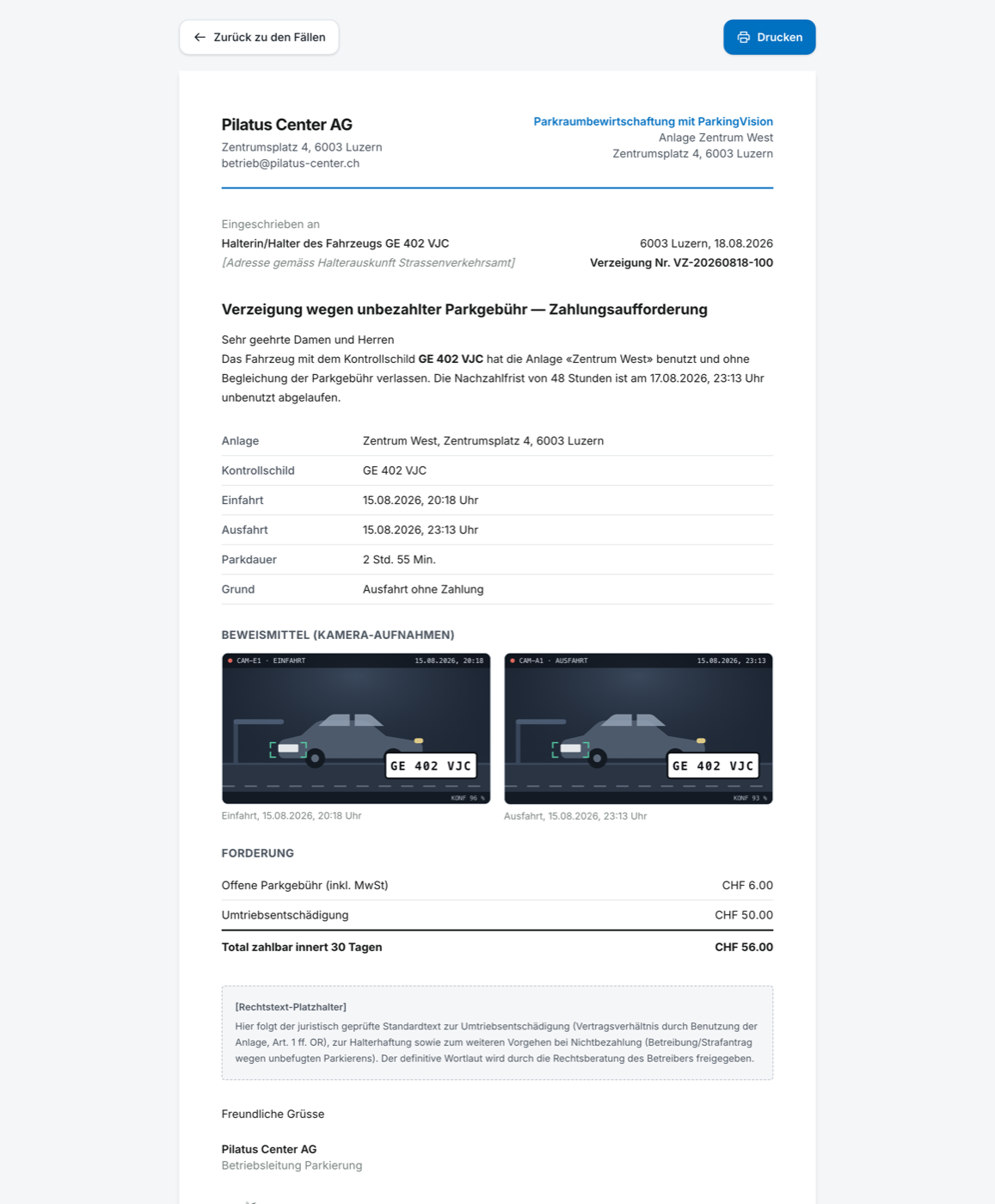
Plate, time stamps and a photographic record for every session. Open cases appear in the portal, and the parking notice is created with one click — with evidence and a prepared payment slip. The decision stays with you.

Tariffs in the portal — set free minutes, hourly rate and daily maximum per site yourself; the grace period is freely selectable. prices by occupancy, time window and special days.

Shopping discount at the till — «free parking from a minimum purchase» as an audited single-use voucher, with no till integration.

Analyses — revenue, occupancy and payment rate from day to year, per site and across all sites.

Parking notice with evidence images, the amount due and a QR payment slip
Parking notice with one click — with evidence images and payment slip. From the platform (pre-release)
Operator portal on a laptop: occupancy, revenue, payment rate and latest movements
Occupancy, revenue, payment rate and movements in a single view — in the browser, nothing to install. From the platform (pre-release)
Operations

Less effort, fewer phone calls

Your team only steps in where a decision is needed. Everything else runs in the background.

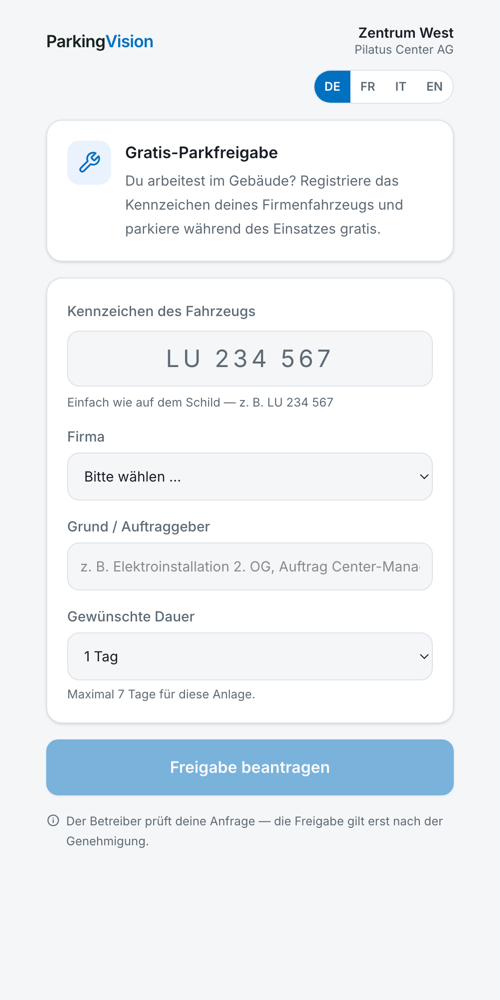
Permits managed by you — permanent authorisations, tenant quotas, self-registration by tradespeople with approval, all audited.

Mobile patrol round — check or scan plates on the premises with a smartphone, with a log.

24/7 monitoring — faults are detected and, if you wish, escalated to a control centre.

Customer experience

Nobody has to install anything

Scan the QR code, enter the plate, pay. Receipt on the phone or by email. For customers without a smartphone, a pay station with a card terminal is planned — paperless, with the same payment flow. It remains an option, not an obligation.

Four languages — DE, FR, IT, EN. The payment page runs in the browser with no app and no registration, and can be operated with a keyboard and a screen reader.

Your look, your brand — the operator's logo, colour and wording on the payment page, on the screens and on the receipts.

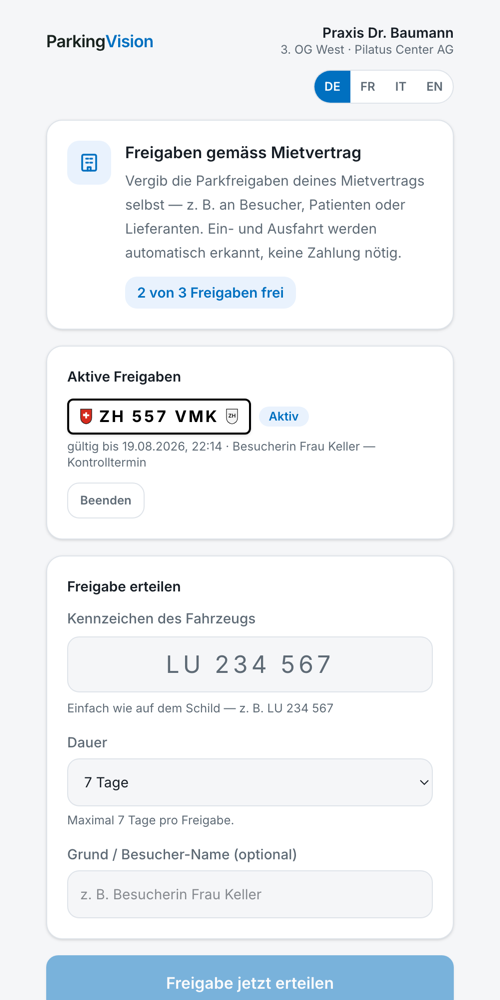
Tenant view on a smartphone
Tenant view
Self-registration for tradespeople on a smartphone
Tradesperson registration
Planning certainty

Decide with figures, not with gut feeling

A parking deck is being refurbished, an event blocks an area, an area is put to another use: ParkingVision is to calculate from your own historical data on which weekdays and at which times of day the remaining area overflows.

You move the construction stage into the quiet week — and inform your tenants with solid figures instead of an apology.

Part of ParkingVision Smart
Products

One platform, five products

All products share the same camera and portal base — sites, captures, analysis. FreeFlow is the core; Secure, Access, Smart and the Parkleitsystem extend it. Individually or combined, freely selectable per site.

Core product · Coming soon

ParkingVision FreeFlow

Barrier-free parking: drive in without stopping, pay by QR code or at the pay station, manage everything in the portal — with permits, parking notices and analytics. For shopping centres, public car parks and company premises. With a parking fee.

Download brochure (PDF) ↓
Coming soon

ParkingVision Secure

Security and evidence — even entirely without parking. Every transit is documented; a black/whitelist reports unwanted vehicles and lets authorised ones pass unnoticed. Map across all sites, evidence images at a click. One camera per direction is enough. No parking fee.

Download brochure (PDF) ↓
Coming soon

ParkingVision Access

LPR-controlled barrier or gate: authorised drivers — tenants, tradespeople, guests — drive in automatically, unauthorised ones stay outside. Fail-secure: the gate stays closed if a fault occurs; local emergency release and intercom on site. For private garages, residential developments and company premises. No parking fee.

Download brochure (PDF) ↓
Coming soon

ParkingVision Smart

Monitoring and management of parking areas of any size — from two or three spaces to a large area. Live occupancy per site with a threshold traffic light. occupancy per zone and level, and the what-if simulation for spaces that fall away. Parking fee optional.

Download brochure (PDF) ↓
Coming soon

Parkleitsystem

Display boards are to guide visitors directly to free spaces — free spaces per zone live at the entrances, with zones and boards managed in the portal.

Download brochure (PDF) ↓
Who it is for

Made for your site

Customers who change from day to day as well as long-stay and long-term parkers — in Switzerland, in Germany and in Austria: plate recognition, currency and VAT are set up per country.

Shopping centres & malls

Your customers drive in without stopping and spend their time in the centre instead of at the pay machine. With vouchers such as «free parking from a minimum purchase» you link the parking fee directly to your sales.

Public car parks

High throughput without queues at the barrier and without arguments about lost tickets. Every parking session is documented without gaps — you deal with unpaid cases in a structured way in the portal.

Private & open parking areas

Even areas without structural access control become manageable: cameras at the entrances are enough. Unauthorised parkers become visible, authorised ones drive in freely — with no patrols at all.

Company car parks & staff areas

Staff and fleet vehicles drive in with a permanent authorisation, visitors and tradespeople are enabled for a limited period — and unauthorised parkers in reserved spaces are visible and documented immediately.

Commercial properties & residential developments

Every tenant receives their parking quota as agreed in the lease and allocates visitor spaces themselves — with no calls to the property management. Management runs centrally, cleanly separated per property.

Leisure, events & tourism

Swimming pools, mountain railways, stadiums and visitor attractions cope with peak days without tailbacks: drive in without stopping, pay by QR code — with no queue at the machine.

In practice

How ParkingVision works day to day

Concrete processes instead of slogans: how customers, tenants and operators experience the platform.

Saturday at the shopping centre

A customer drives in — the camera captures the plate, no barrier slows her down. When she pays at the till, she receives a voucher on her receipt once she has reached the minimum purchase. Redeemed on the payment page, it covers the parking fee: the exit is clear, the receipt goes to her phone.

Public area without staff

A commuter pays in the morning in 20 seconds by QR code on the phone. Another drives out without paying: the session appears with a camera image as an open case in the portal — once the grace period has passed, the parking notice is created with one click, and minor cases are written off by category.

Building work: 40 spaces fall away

The parking deck is being refurbished. ParkingVision Smart calculates from the historical data when the remaining area will overflow — the operator moves the construction stage into the quiet week and informs tenants with figures instead of gut feeling.

Commercial property with tenants

The medical practice on the third floor has three visitor authorisations in its lease — and allocates them itself through its tenant link: type in the patient's plate, done, the entrance recognises it automatically. The plumber registers his company vehicle through the tradespeople page; it is only free of charge once the property management has approved it. All audited, nothing over the phone.

Day-to-day operation & faults

A camera fails during the night: the platform alerts the control centre with an event image. In the operating variant with a device on site, the gateway buffers and parking operation continues. In the morning the dashboard shows the occupancy traffic light, the payment rate and revenue against the previous week. the patrol round by phone.

Monday on the company premises

Staff and fleet vehicles drive in with a permanent authorisation — nobody stops. A visitor reports to reception, and the assistant authorises his plate for the day. A supplier's field representative is standing in a reserved space: the platform reports «not authorised», and the case is documented with an image.

Event day at a visitor attraction

Concert weekend: everyone drives in without stopping and pays by QR code — no staff at the entrance, no queue. On Monday the portal shows the occupancy, payment rate and revenue for the weekend. an event surcharge through dynamic tariffs, and guidance to zones with free spaces.

Installation & migration

What the building work involves

Cameras at the entrances, a gateway on site — no barriers, no ticket machines, no induction loops.

Per entrance and exitOne camera per lane — pole or wall mounting, power and a network connection
Needed on siteAn internet connection and a protected place for the gateway — nothing more
Installation timeAs a rule one to two days per entrance — the car park stays open while the work is carried out
Existing barrierCan be left standing open or removed — ParkingVision does not need it
Changeover without interrupting operation

We transfer your existing long-term parkers and season-ticket holders into the platform with their plates and contract periods — as a simple list, read in at commissioning. During the transition your existing installation keeps running, so that not a single parking day is lost.

Frequently asked questions

What operators want to know before they sign

The questions from every consultation — answered directly.

What happens if somebody does not pay?

The session appears with a camera image and time stamps as an open case in the portal. Once the 48-hour grace period has passed, you create the parking notice with one click, with evidence and a prepared payment slip. If payment still does not arrive, the legal route follows — Betreibung (Swiss debt enforcement) or a criminal complaint for unauthorised parking; the definitive wording is approved by your legal advisers.

How long after leaving can payment still be made?

48 hours as standard — you set the grace period yourself in the portal, and the display at the exit points it out.

How reliably does the camera read the plate?

The camera manufacturer states over 99 % for plate recognition under normal conditions (AXIS ALPV 3.x, manufacturer's figure). A measurement of our own at your site is part of the acceptance. Dirty or obscured plates appear as an open case with a camera image — your team checks them by hand, nothing is lost. At night and under infrared the camera supplies no vehicle characteristics; the plate is still read.

And motorcycles, trailers, interchangeable plates?

Motorcycles carry their plate at the rear only — we solve this with an additional camera per lane, mounted facing the other way to capture the rear. Trailers with their own plate are captured separately, and interchangeable plates work like any other: what counts is the plate that is fitted.

Which means of payment are accepted?

Credit and debit cards, TWINT, Apple Pay and Google Pay — directly on the payment page in the browser. a machine with a card terminal in addition, paperless.

What does it cost?

A fixed monthly price per site, graduated by the size of the site — with no share of your parking income. Hardware to buy or to rent. In the consultation you receive a site assessment with an indicative quotation.

What happens to the plate data?

Hosting in Switzerland, data sovereignty with the operator, no vehicle-keeper lookup, strictly separated per client, designed to comply with the GDPR and the revDSG. Plate data from completed sessions is deleted automatically — you set the retention period in the portal, and open cases remain until they are closed.
Contact

Two ways to reach ParkingVision

Sales and installation run through regional contract partners — operators and partners get in touch here.

All product brochures Download one-pager (PDF)

You operate a site

Tell us about your site — entrances, number of spaces, how it is managed today. We will come back to you with a site assessment.

Opens your email client with the enquiry prepared.

You would like to become a contract partner

Sales and installation of ParkingVision run through regional partners.

Opens your email client with the enquiry prepared.